A few new tags to learn
There are a lot more tags, but we will just cover a few more for now, mostly because they are straightforward to use and you can see the effect in your web page when you use them:
- <q> - The q tag is for quotes. This has no relationship to the somewhat confusing single and double quote characters, rather it's used when you want to quote a person or written work in your web page. It is customarily displayed using quotation marks, again unrelated to strings. Thus <q>Brevity is beautiful</q> would be rendered as
Brevity is beautiful
. - <blockquote> - If you want to quote a larger passage, you may want to use blockquote, which will typically set the quoted text apart from the surrounding text and indent it, to make clear that it is quoted text:
Early to bed and early to rise, makes someone healthy, wealthy and wise - Benjamin Franklin
- <ul>, <ol> - These two tags are used to indicate a list of things. The only difference is that <ol> is an "ordered" list, meaning the elements are in a particular order, and it might be a good idea to number them. The "u" in <ul> stands for "unordered" and is used for a list of things where the order doesn't really matter, so it is usually rendered as a bulleted list, or something else without numbers.
- <li> - The li element is a "List Item", i.e. one item in the list. As you might expect, this element only really makes sense nested inside a list (<ul> or <ol>). In the final rendering, each <li> element would typically be preceded by a number or bullet, or something similar (but not necessarily). Thus a list in HTML would be look something like this:
- <ul>
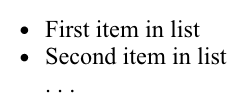
- <li> First item in list </li>
- <li> Second item in list </li>
- . . .
- </ul>
This code might be rendered like this:
There are a couple more tags I want to bring up at this point, but first a disclaimer. We have been emphasizing the general rule that HTML is for the logical structure of your content, not what it looks like. Well, nothing is perfect, including this goal. There are some HTML elements that are primarily used to satisfy certain formatting requirements.
- <hr> - This one might be debatable. HR originally stood for "Horizontal Rule", i.e. a horizontal line across the width of the text. It's still there in HTML5, but now is officially supposed to represent a "thematic break" in the content. It would typically look like this:
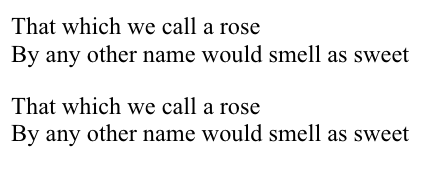
- <br> - This one signifies a line break. It is used for any number of purposes. For example it can be an easy way to make sure that lines of poetry break where they're supposed to (less verbose than requiring each line to be a separate element). Essentially it helps break the "white space" rule, where spaces and carriage returns are generally treated the same, the <br> tag is treated as a required carriage return. Because it's an empty tag (doesn't contain any text or anything, just indicates a particular point in the text), it doesn't really need a close tag, so it can be written as <br>, though<br /> is also acceptable. Oddly, in the browsers I tried, if you do add a close tag, as in <br></br>, the close tag is interpreted as a regular br tag, thus you get two line breaks in a row. One other thing to remember is that the <br> tag implies a break even if there is no break in the text containing it, i.e. these two sentences would be formatted exactly the same:
- That which we call a rose <br>
- By any other name would smell as sweet
- That which we call a rose <br> By any other name
- would smell as sweet
- <pre> - This is another tag that helps you break the white space rule. PRE stands for "PREformatted text", meaning "I've set this up just the way I want it, don't mess with it." It generally implies a monospace font, and none of the spaces, tabs or carriage-returns are ignored. It is very handy for illustrating bits of program code, or other "typewritten" material:
    <pre>
        <h1>Page Heading</h1>
        <p>And here is the first paragraph</p>
    </pre>


0 comments:
Post a Comment