HTML entities and special characters
HTML ENTITIES
Before we learn what HTML entities are, let's look at how the need for them came about.
Try the following file in your HTML:
- <p>Welcome to the Introduction to HTML 5. The first tag we will be learning about is the <html> tag.</p>
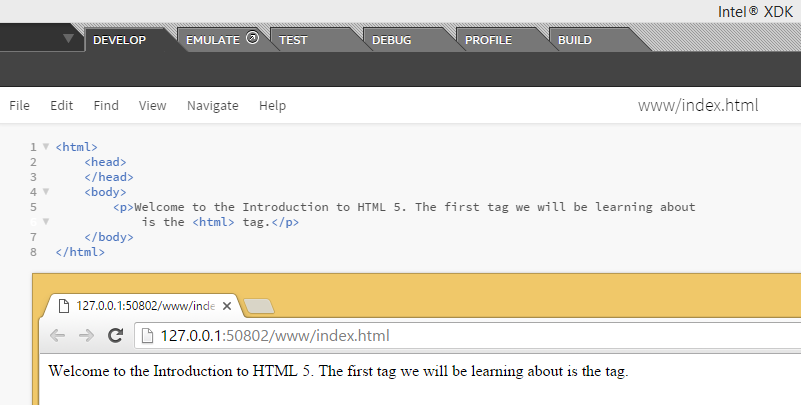
Did you notice the '<html>' tag is missing in your ouput? Basically, your browser mixed it up with an actual tag though you only meant it to be part of your sentence as text.
Because of this kind of confusion, HTML reserves certain characters. If you want to use these characters in your HTML, you need to use character entities to display them. In layman terms, character entities are like substitutes. There are entities in HTML for several categories and these include:
- currency symbols
- copyright, trademark and registered symbol
- general punctuation
- arrows
- mathematical symbols
- Greek letters
All HTML entities have a name and number. They can be written using either name or number.
If it is a name, an ampersand symbol '&' will precede it, followed by entity name and a semi-colon. Entity names are case sensitive.
&entity_name;
If it is a number, an ampersand '&' symbol, followed by the number/hash symbol '#', entity number and a semi-colon.
&#entity_number;
SPECIAL CHARACTERS
You can find all HTML entities, their names and numbers here: https://dev.w3.org/html5/html-author/charref
But can you imagine replacing all your characters with entities? That is going to make coding in HTML5 very difficult. Apart from the five special characters listed in the table below, you don't have to specify entities for others like math, currency and copyright symbols.
But for these, you definitely need to replace them with entities:
| Symbol | Entity Name | Entity Number | Usage |
| Less than '<' | < | < |
Div tag: <div>
|
| Greater than '>' | > | > | Div tag: <div> |
| Ampersand '&' | & | & | Tom & Jerry |
| Non breaking space ' ' - space that will not create a new line | |   | If you add multiple spaces, the browser will remove all but one. So you have to use this entity to add multiple spaces in your HTML page. |
| Quotes " | " | " |
Link to a another section on the same page using id of the element: <a href="#timetable">
Displayed as: <a href="#timetable">
" is generally encouraged for code. For an actual quotation, <q> or <blockquote> is preferred.
|
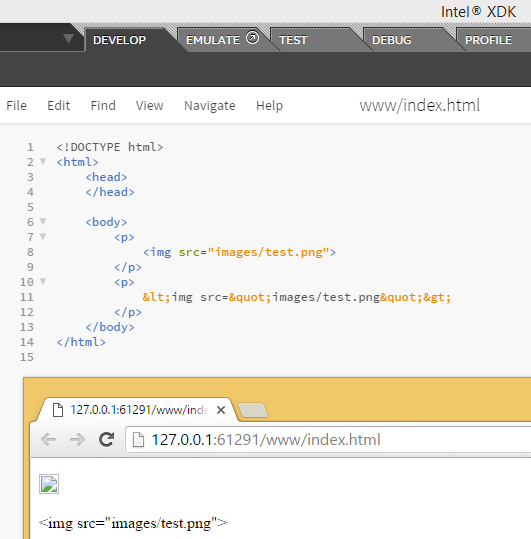
We do not want these special characters to be processed by the browser as HTML code. Instead, you want it to be displayed to the user. So if you wish to display this in your browser:
<img src="images/test.png">
You have to write it like this in your HTML code:
<img src="images/test.png">


0 comments:
Post a Comment