Recipe project - Week 1
Throughout the course, we'll be building a simple project, adding to it with what we've learned each week.
This project will be a simple Web App that will allow you to browse different recipes.
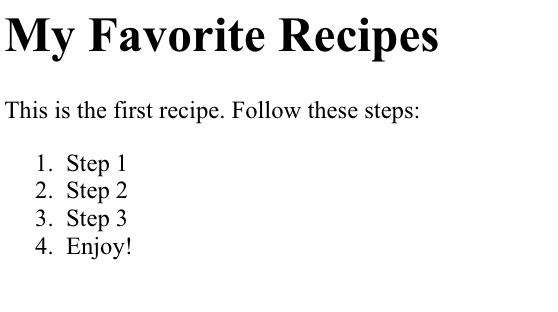
This week we'll start off with a simple first draft using just what we've learned about HTML5 using tags we've covered. We want to have the following components:
- A large title for the app, something like "My Favorite Recipes", or whatever you'd like to call it.
- A description of a recipe, just some plain text explaining what the recipe is and any other pertinent information.
- A set of steps to follow, numbered in order.
When you're done you should have something like this:
If you have any questions or problems, discuss them below.
SHARING YOUR CODE
Of course, having a Web page isn't as much fun if you don't have a way to share it. There are a number of different possibilities. If you type "Web hosting static webpages" or something similar into your favorite search engine, you can find a number of different options.
One free option is to use 'github', which provides a place to store and track your project as well as a way to host static web pages using 'github pages'. If that's something you're interested in, you can find out more about it here. Other project hosting sites offer similar possibilities.
Another easy way to share your app is to take advantage of the build feature of Intel® XDK. This allows you to build your page as a mobile app that can be installed on phones and tablets. You can find out more about that here.
Video: recipe project - Week 1
Hopefully you've tried this little bit on your own.
This shows you what I did, which could be similar to what you did.
First a title for our recipe project.
I'll just leave it generic for now, (I don't have any bright ideas).
Then under "My Favorite Recipes », we'll give an example of a recipe.
Again, this will just be generic, so I'll have some instructions for the recipe.
And then often you have a list of steps for a given recipe.
So we'll add that as a list.
Each item of the list will be another step in the process.
For now I'll just put Step 1, Step 2, Step 3, and so on.
To make it a little quicker I'll just copy those and change "First" to "Second" and "Third".
Since these are in order, it might make more sense to have an ordered list instead of unordered list.
We change the open and close tags to 'ol’, and you'll see we've got numbers instead of bullets over there.
One more thing we could try is a list of ingredients.
Let's put the list of ingredients up ahead of the instructions.
Again, we just put in some generic ingredients.
It's not necessarily as important for these to be ordered so I'll just use an unordered list for now.
And then we want something telling us that this is the list of ingredients, so I'll put in a paragraph.
A paragraph works fine, but this is really more of a header so let's change that to h3.
So it'll be a header, but smaller than the main header above.
The recipe instructions below are often more prose-like, so we'll just leave those as paragraphs.
It looks good! So far, so good!


0 comments:
Post a Comment